CSV Files
Overview
This week's lab will cover the following:
- Defining CSV files.
- Using Python to read CSV files.
- Using Python to write CSV files.
Lecture Slides
Creating your Github Repo for Lab 9
Use the following link to set up a GitHub repository for Lab 9. Open your Lab 9 repository in GitHub Codespaces, and open the provided template lib.py. Update the comment block with the appropriate information for name and date.
Note: There is also a lab9a.py. You will use lab9a later in the lab.lib.py
Before we get started on the lab, we need to create a library file that we will use in lab9a.py. This library will contain two functions:
- write_csv - This function will accept two arguments, source and dest. The function will read the provided .dat file (which contains usernames), append a domain name for an email address and write the data to the destination .csv file in CSV (comma separated value) format.
- read_csv - This function will accept one argument, dest. The function will read the data from the file and print it on the screen in a tab separated format.
The write_csv function
Open the lib.py file in your repository and declare a function write_csv that accepts the arguments source and dest:
def write_csv(source, dest):
Follow the indentation of the provided comments to complete the code. Import the os and sys modules.
import os, sys
Use an if statement to check if the source file exists. If it doesn't, exit indicating an error.
		if not os.path.exists(source):
			sys.exit(source, " does not exist")
Still inside the function, fill in the else block (else, the source file exists). Open the source file with read permission and the destination file with write permission.
		else:
			users = open(source, 'r')

			maiden = open(dest, 'w')
Still in the else block, you are going to write a header (username,email) to the CSV file. Then, use a for loop to complete the following:
- Loop through each user in the provided .dat file.
- Append the domain name (ironmaiden.com) to the username.
- Print the output on the screen (using sep).
- Write the username and email to the .csv file.
		maiden.write("username,email\n")

		for user in users:

			user = user.strip()

			email = user + "@ironmaiden.com"

			print(user, email, sep=",")

			maiden.write(user + "," + email + "\n")
Finally, close the source (.dat) and destination (.csv) files
		users.close()

		maiden.close()
The read_csv function
Declare the read_csv function that accepts the argument dest:
def read_csv(dest):
Open the file maiden.csv for reading.
maiden = open(dest, 'r')
Use a for loop to:
- Read each line in the file.
- Strip the new line character.
- Split the line into a list of strings.
- Print the contents out separated by a tab, with a fixed field size.
		for line in maiden:

			line = line.strip()

			data = line.split(",")

			print(f"{data[0]:10}\t{data[1]}")
Close the file.
lab9a.py
Open the provided template lab9a.py. Update the comment block with the appropriate information for name, date, and usage.
Import both functions by name from lib.py
from lib import write_csv, read_csv
Use the print function to print a message to the user indicating data is being written to the .csv file.
print("Writing the following data:\n")
Call the write_csv function with the arguments users.dat and maiden.csv.
write_csv("users.dat", "maiden.csv")
Use the print function to print a message to the user indicating data is being read from the .csv file.
print("\nConfirmation the .csv file has been created. Output shown as separated by a tab.\n")
Call the read_csv function with the argument maiden.csv.
read_csv("maiden.csv")
Completing the Lab
Your script should produce output similar to the following. You should notice running lab9a.py created the file maiden.csv. If it does not, go back and complete whatever you've missed.
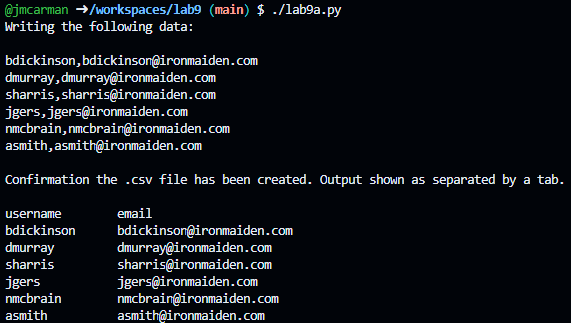
Upon completing the of the lab you have created python scripts that use functions and demonstrate reading and writing csv files.
Exploration Questions
The following questions are for furthering your knowledge only, and may appear on quizzes or tests at any time later in this course.
- What is a csv file?
- How could you apply what you have learned in this lab to a real-world scenario?
- What does strip do?
- What does split do?