Loops
Overview
This week's lab will cover the following:
- Using for and while loops (aka iterative logic).
- Differentiate between for and while loops.
- Using the break statement.
- Incorporate conditional logic (if statements) in while loops.
- Using lists in for loops.
- Using the range function.
Lecture Slides
Creating your Github Repo for Lab 6
Use the following link to set up a GitHub repository for Lab 6. Open your Lab 6 repository in GitHub Codespaces, and open the provided template lab6a.py. Update the comment block with the appropriate information for name, date, and usage.
Note: There is also a lab6b.py, lab6c.py & lab6d.py, which you will be using later in the lab.Loops
Loops are used to repeat a block of code multiple times. Python has two types of loops: the for loop and the while loop. The for loop is used to iterate over a sequence (such as a list, tuple, or string), while the while loop is used to repeat a block of code as long as a condition is true. You use a for loop when you can reliably predict when it is going to end. You use a while loop when you do not know how many times it will run.
Lab6a
Use the following code, create a list of cars.
cars = ['Toyota', 'Honda', 'Ford', 'Chevrolet', 'Nissan']
Use a for loop to iterate through the list of cars and print each one.
	for car in cars:
		print(car)
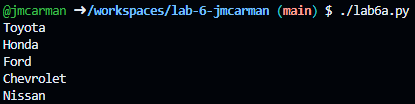
Test your script. Once it is producing the sample output below, close it and open lab6b.py.
Lab6b
Update the comment block with the appropriate information for name, date, and usage.
Import the sys module.
import sys
Use the input function to prompt the user for a number. Store the value in the variable num.
number = input("Please enter a number: ")
Use an if statement to validate if input is a number or the number is greater than zero. If either condition is met, you will exit with an error (using sys.exit).
	if not number.isdigit() or int(number) <= 0:
		sys.exit("Invalid input. Please enter a positive integer.")
Next, you are going to use a for loop to iterate through a list of numbers (using the range function) and print odd numbers.
	for num in range(int(number)):
		if num % 2 != 0:
			print(num)
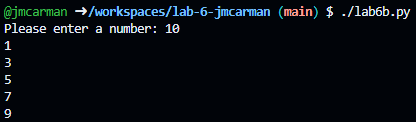
Test your script. Once it is producing the sample output below, close it and open lab6c.py.
Lab6c
Update the comment block with the appropriate information for name, date, and usage.
To do:
Using the code you wrote in lab6b.py, fill in the code in the template for lab6c.py. Everything is the same, except this time you are checking if the number is even (using the following code). If it is, you are printing the number.
	if num % 2 == 0:
		print(num)
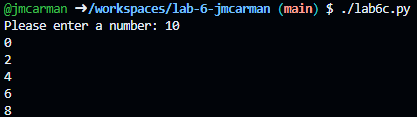
Test your script. Once it is producing the sample output below, close it and open lab6d.py.
Lab6d
Update the comment block with the appropriate information for name, date, and usage.
Import the random module.
import random
Use the randint function to generate a random number between 1 and 10. Store the value in the variable number.
number = random.randint(1, 10)
Initialize Guess to -1, and convert it to an integer.
	guess = -1
	int(guess)
Use a while loop to keep the game going until the user guesses the correct number.
	while guess != number:
		guess = input("Guess a number between 1 and 10: ")
If guess is equal to number, use print to display "You guessed the correct number" and break out of the loop.
		if int(guess) == int(number):
			print("You guessed the correct number!")
			break
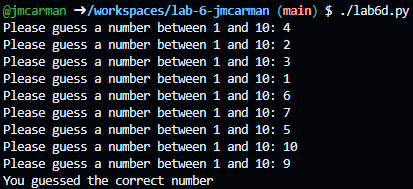
Test your script. Once it is producing the sample output below, you have completed the lab.
Completing the Lab
By the end of the lab you have created four Python scripts that demonstrate the use of loops. You have also learned how to use the for loop and the while loop. You have also learned how to use the range function to generate a list of numbers.
Exploration Questions
The following questions are for furthering your knowledge only, and may appear on quizzes or tests at any time later in this course.
- When should you use a for loop?
- When should you use a while loop?
- What does the break statement do?
- How do you nest if statements inside a loop?