Modules
Overview
This week's lab will cover the following:
- Use modules.
- Create a function in a library program.
- Use a function from another program.
- Use functions, loops and lists.
- Use Python to write data to a file.
Creating your Github Repo for Lab 10
Use the following link to set up a GitHub repository for Lab 10. Open your Lab 10 repository in GitHub Codespaces, and open the provided template lib.py. Update the comment block with the appropriate information for name, date, and usage.
Note: There is also a lab10a.py and lab10b.py. You will use lab10a and lab10b later in the lab.Creating functions for lab10a in lib.py
Your function library (lib.py) is going to contain five functions in total. Two functions for lab10a and three functions for lab10b. You are going to write the following functions for lab10a first.
- validateName - This function will accept one argument, name. The function will return True if the name is valid, and False if the name is invalid. A valid name is a string that contains only letters and spaces. Once the name is valid, it will return it.
- validateBday - This function will accept one argument, birthday. It will return True if the birthday is not empty, a string, and in the format dd/mm/yyyy. Once the birthday is valid, it will return it.
The validateName function
Open the lib.py file in your repository and declare a function validateName that accepts the argument name:
def validateName(name):
Follow the indentation of the provided comments to complete the code. First, import the sys module
import sys
Use the following if block to check if the name is valid. If it is not valid (is empty, is not a string, or contains numbers), print an error message and exit the program. If name is valid (using else), return name.
		if name == "":

			sys.exit("You must enter a name")

		elif not isinstance(name, str):

			sys.exit("You must enter a string.")

		elif name.isdigit():

			sys.exit("Name cannot contain numbers.")

		else:

			return name
The validateBday function
Still in lib.py, declare a function validateBday that accepts the argument birthday:
def validateBday(birthday):
Follow the indentation of the provided comments to complete the code. First, import the sys module
import sys
Use the following if block to check if the birthday is valid. If it is not valid (is empty, is not a string, or is not in the format dd/mm/yyyy), print an error message and exit the program. If the birthday is valid (using else), return birthday.
		if birthday == "":

			sys.exit("You must enter a birthday.")

		elif not isinstance(birthday, str):

			sys.exit("You must enter a string.")

		elif len(birthday) != 10:

			sys.exit("You must enter a birthday in the format dd/mm/yyyy.")

		elif birthday[2] != "/" or birthday[5] != "/":

			sys.exit("You must enter a birthday in the format dd/mm/yyyy.")

		else:

			return birthday
Save your changes and commit them to your repository.
lab10a.py
The program you are going to write in lab10a is going to use the functions you wrote in lib.py, prompt the user to enter their name and birthday in the format dd/mm/yyyy and calculate their age. Open the provided template lab10a.py. Update the comment block with the appropriate information for name, date, and usage.
Importing the datetime module, validateName, and validateBday functions
Use the import statement to import the following:
- datetime module
- validateName function from lib.py
- validateBday function from lib.py
Creating variables for the current day, month, and year
Use the following code to create variables for the current day, month, and year:
		curDateDay = datetime.datetime.now().day
		curDateMonth = datetime.datetime.now().month
		curDateYear = datetime.datetime.now().year
Prompting the user for their name and birthday
Use the following code to prompt the user for their name and validate the input using the validateName function:
name = validateName(input("Enter your name: "))
Use the following code to prompt the user for their birthday and validate the input using the validateBday function:
birthday = validateBday(input("Enter your birthday dd/mm/yyyy: "))
Calculating the user's age
In order to accurately calculate the user's age, you need to convert the user's birthday into a format you can perform math on. There are a few ways you could do this. You are going to use the following code to split the birthday into separate variables for day (bdayDay), month (bdayMont) and year (bdayYear):
bdayDay, bdayMonth, bdayYear = birthday.split("/")
Next, calculate the user's age using the following code. Store the output in the variable age.
age = curDateYear - int(bdayYear)
This gives us the same calculation as we did in Lab 1, which you may recall wasn't accurate. To correct it, you need to add some logic to check the current month and current date against the provided birth date and correct the age calculation as needed. The following if block will do so.
	if int(bdayMonth) > curDateMonth:

		# Subtract one from the user's age
		age -= 1

		# Print a hello message with the user's name and age
		print(f"Hello {name}, you are {age} years old.")
If the user's birthday is less than the current month, then the previuos calculation does not need adjusting. Print the message.
	# If the user's birthday month is less than the current month
	elif int(bdayMonth) < curDateMonth:

		# Print a hello message with the user's name and age
		print(f"Hello {name}, you are {age} years old.")
If the user's birthday month is equal to the current month, we need to figure out if it has already happened (and adjust accordingly) or is today. You can do that using a nested if block
	# If the user's birthday month is equal to the current month
	elif int(bdayMonth) == curDateMonth:

		# If the user's birthday day is greater than the current day
		if int(bdayDay) > curDateDay:

			# Subtract one from the user's age
			age -= 1

			# Print a hello message with the user's name and age
			print(f"Hello {name}, you are {age} years old.")

		# If the user's birthday day is equal to the current day
		elif int(bdayDay) == curDateDay:

			# Print a happy birthday message
			print("Happy birthday!")

		    # Else
    	else:

        # Print a hello message with the user's name and age
        print(f"Hello {name}, you are {age} years old.")
Save your changes and commit them to your repository. Your script should produce output similar to the following. If it does not, go back and complete whatever you've missed.

Creating Functions in lib.py for use in lab10b.py
The combine function
Open the lib.py file in your repository and add a function called combine. This is identical to the function we used in Lab 7.
	def combine(prefix, suffix, place):

		return prefix + " " + suffix + " of " + place
Next, we're going to write two functions.
- writeName
- This function will accept one argument, name. The function will write the name to a file called names.dat. If the file does not exist, it will be created. If the file does exist, the name will be appended to the file.
- readNames
- This function will accept no arguments. The function will read the names from the names.dat file and print them on the screen.
The writeName function
Open the lib.py file in your repository and declare a function writeName that accepts the argument name:
def writeName(name):
To do:
Using what you have learned previously, import the os and sys modules.
Checking if the file names.csv exists
If the file names.dat does not exist, it will be created. If the file does exist, the name will be appended to the file. Use the following code to check if the file exists:
	# If the file names.csv does not exist
	if not os.path.exists("names.dat"):

		# Create the file names.dat
		open("names.dat", "w").close()
Opening the file for writing
Use the following code to open the file names.dat with append privileges.
with open("names.dat", "a") as file:
Use the following code to:
- write the name to the file
- print a success message that it has been written
- close the file
		# Write the name to the file
        file.write(name + "\n")

        # Print a success message to the screen
        print("Name written to names.dat")

        # Close the file
        file.close()
The readNames function
Open the lib.py file in your repository and declare a function readNames that accepts no arguments:
def readNames():
To do:
Using what you have learned previously
- import the os and sys modules
- check if the file names.dat exists. Exit indicating an error if it doesn't.
Opening the file for reading
Use the following code to:
- open the file names.dat with read privileges
- read each line in the file
- print the name to the screen
- close the file
Save your changes and commit them to your repository.
lab10b.py
The program you are going to write in lab10b is going to:
- Use the functions you wrote in lib.py
- Create a lists of prefixes and places
- Prompt the user to enter their name and a number of names to generate
- Use a for loop to select one random prefix and one random place, and combine it with the name they input
- Prompt the user if they wish to write the name to the file
- Print the names
Open the provided template lab10b.py. Update the comment block with the appropriate information for name, date, and usage.
To do:
Using what you have learned previously
- import the random module
- import the combine, writeName and readNames functions from lib.py
Create a list called prefixes, using the following list:
- Sir
- Lady
- Lord
- Dame
- Master
- Mistress
- Baron
Create a list called places, using the following list:
- Mordor
- Rivendell
- The Shire
- Gondor
- Isengard
- Lothlorien
- Rohan
- Minas Tirith
- Hobbiton
Prompt the user to enter their name using the prompt "Enter your name: ". Store the output in the variable name.
Prompt the user to enter the number of names to generate using the prompt "Enter the number of names to generate: ". Store the output in the variable numNames. Don't forget to convert this to an integer (int).
Generating a random name and writing it to the file
Use the following code to create a for loop that will run numNames times. In the loop, select a random prefix and place from the lists you created earlier. Combine the prefix, place, and name using the combine function. Store the output in the variable fullName. It will then prompt the user if they wish to write the name to the file names.dat, and write it if the user selects yes (y).
		# Create a for loop that generates the number of names the user requested.
		for each in range(int(numNames)):

			# Generate a random prefix
			prefix = random.choice(prefixes)

			# Generate a random place
			place = random.choice(places)

			# Concatenate the prefix and suffix together using the combine function.
			fullName = combine(prefix, name, place)

			# Print the name to the screen.
			print(fullName)

			# Prompt the user if they would like to write this name to the file names.dat
			writeToFile = input("Would you like to write this name to the file names.dat? (y/n) ")

			# If the user enters y
			if writeToFile == "y":

				# Call the writeName function and pass the fullName to it.
				writeName(fullName)
Printing a message to the screen and the contents of the file names.dat
Use the following code to print a message (displaying names.dat contains:) to the screen and call the readNames function to print the contents of the file names.dat.
		# Print a header message to the screen
		print("names.dat contains:\n")

		# Call the readNames function to read the contents of the file names.dat and print them to the screen.
		readNames()
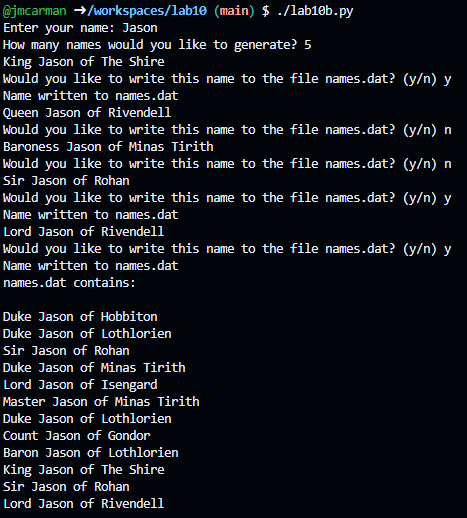
Save your changes and commit them to your repository. Your script should produce output similar to the following. If it does not, go back and complete whatever you've missed.
Completing the Lab
Upon completing the of the lab you have created three python scripts that demonstrate a function library, using conditional and iterative logic, and appending to files. Hopefully these served as a review for most of the topics covered in this course. Good luck next week with Test 3.
Introduction to GitHub Copilot
GitHub Copilot is an AI-powered code completion tool that can help you write code faster and with fewer errors. It can suggest entire lines or blocks of code based on the context of what you're writing. You can learn more about GitHub Copilot here. This GitHub Classroom assignment will help you get started with GitHub Copilot. All of the code you need and instructions are included in the provided code.