Lists, Tuples & Sets
Overview
This week's lab will cover the following:
- Define lists, tuples and sets.
- Use list methods and functions.
- Accessing list elements.
- Accessing a list as a whole.
- Converting lists, tuples and sets.
Lecture Slides
Creating your Github Repo for Lab 5
Use the following link to set up a GitHub repository for Lab 5. Open your Lab 5 repository in GitHub Codespaces, and open the provided template lab5a.py. Update the comment block with the appropriate information for name, date, and usage.
Note: There are also files for lab5b.py, lab5c.py and lab5d.py which you will be using later in the lab.Overview: Lists, Tuples and Sets
Python has three data types that can be used to store multiple items in a single variable, which is known as an array in most other programming language. These are lists, tuples and sets. Each has its own unique properties and uses. Lab5a will cover lists, lab5b will cover tuples, lab5c will cover sets. Lab5d will cover converting from one to the other.
Lists
Lists are created like a variable, only using square brackets surrounding a comma separated list of items. Use the following code to create a list called distros. The list will contain names of Linux distributions.
distros = ["Ubuntu", "Fedora", "Debian", "Arch", "Red Hat Enterprise Linux"]
You can print the entire list using the print function, and providing the name of the list as the value to be printed.
print(distros)
Lists are zero indexed, meaning the first element of the list is identified with a zero. You can access any element in a list using the name of the list, followed by the number of the element you wish to access (enclosed in square brackets). For example: distros[0] will contain the value Ubuntu. distros[1] will contain the value Fedora, etc. You can access the last element of the list by using -1 as the element. This becomes much more useful with loops, which you will learn in Lab 6.
To print the first element of the list, enter the following:
print(distros[0])
To print the last element of the list, enter the following:
print(distros[-1])
List functions
Lists have built-in functions that can be used to manipulate the list. The len function will return the number of elements in the list. The following code will print the number of elements in the list.
print(len(distros))
Lists can be sorted using the sort method. The following code will sort the list in ascending order and print it.
print(sorted(distros))
Lists can be reversed using the reverse method. The following code will reverse the list and print it. Note, this reverses the list by order of item, not alphabetically.
print(distros[::-1])
To sort a list in reverse alphabetical order, use the following code:
print(sorted(distros, reverse=True))
Modifying Lists
You can append an element to the end of a list using the append method. The following code will add the element CentOS to the end of the list.
distros.append("Linux Mint")
To do:
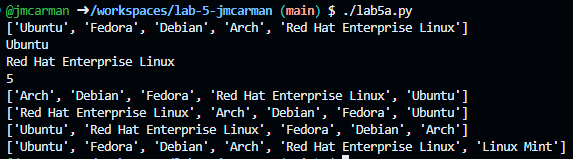
Using what you learned at the beginning of lab5a, use the print function to print the list.
Your script should produce output similar to the following. If it does not, go back and complete whatever you've missed.
Tuples
Open the provided template lab5b.py. Update the comment block with the appropriate information for name, date, and usage.
Tuples are similar to lists, but are immutable, meaning they cannot be changed once they are created. Tuples are created using parentheses (round brackets) instead of square brackets. Use the following code to create a tuple called distros. The tuple will contain names of Linux distributions.
distros = ("Ubuntu", "Fedora", "Debian", "Arch", "Red Hat Enterprise Linux")
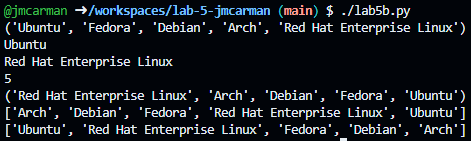
All of the list functions you learned in lab5a can be used with tuples, except for the functions that modify the list. Using what you learned in lab5a, complete the following:
- Print the tuple.
- Print the first element of the tuple.
- Print the last element of the tuple.
- Print the number of elements (length) in the tuple.
- Print the tuple sorted in reverse order.
- Print the tuple sorted in alphabetical order.
- Print the tuple sorted in reverse alphabetical order.
Your script should produce output similar to the following. If it does not, go back and complete whatever you've missed.
Sets
Open the provided template lab5c.py. Update the comment block with the appropriate information for name, date, and usage.
Sets are similar to lists, but are unordered and do not allow duplicates. Sets are created using curly braces. Use the following code to create a set called distros. The set will contain names of Linux distributions.
distros = {"Ubuntu", "Fedora", "Debian", "Arch", "Red Hat Enterprise Linux"}
All of the list functions you learned in lab5a & b can be used with sets, except for the functions that modify the list. Using what you learned in lab5a & b, complete the following:
- Print the set.
- Use the following code to add "Linux Mint" to the set.
- Print the set again.
- Print the number of elements (length) in the set.
- Use the following code to remove Arch from the set.
- Print the set again.
- Print the number of elements (length) in the set.
distros.add("Linux Mint")
distros.remove("Arch")
Your script should produce output similar to the following. If it does not, go back and complete whatever you've missed.

Converting Lists, Tuples and Sets
Open the provided template lab5d.py. Update the comment block with the appropriate information for name, date, and usage.
Up until now you have used the import function to import modules. You can also use the import function to import variables, lists, tuples or sets from one script to another. Additionally, you can use the import function to import functions from one script to another. You will learn about functions in Lab 7. Use the following code to import the list distros from lab5a.py into lab5d.py.
from lab5a import distros
To do:
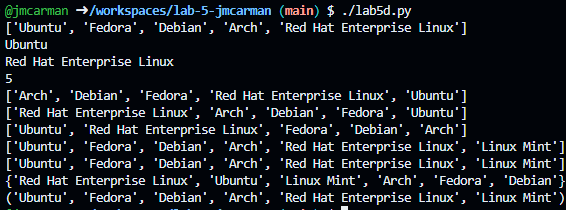
Using what you have learned previously, print the list.
Converting Lists to Sets
To convert a list to a set, create the list and use the set function to convert it to a set. The following code will convert the list distros to a set called distros_set.
distros_set = set(distros)
To do:
Using what you have learned previously, print the set (distros_set).
Converting Sets to Tuples
To convert a list to a tuple, create the tuple and use the tuple function to convert it to a tuple. The following code will convert the list distros to a tuple called distros_set.
distros_tuple = tuple(distros)
To do:
Using what you have learned previously, print the tuple (distros_tuple).
Your script should produce output similar to the following. If it does not, go back and complete whatever you've missed.
Completing the Lab
Upon completion of this lab you should have completed lab5a.py, lab5b.py, lab5c.py and lab5d.py. You learned about lists, tuples and sets. You learned how to access elements, sort, add and remove (where applicable) and print the contents.
Exploration Questions
The following questions are for furthering your knowledge only, and may appear on quizzes or tests at any time later in this course.
- What is the difference between a list, tuple and set?
- How can you convert between a list, tuple and set?