Files
Overview
This week's lab will cover the following:
- Using files in Python.
- Reading from files.
- Using user provided input to append to files.
- Closing files.
Lecture Slides
Creating your Github Repo for Lab 8
Use the following link to set up a GitHub repository for Lab 8. Open your Lab 8 repository in GitHub Codespaces, and open the provided template lab8a.py. Update the comment block with the appropriate information for name, date, and usage.
Note: There is also a lab8b.py & users.dat. You will be using users.dat in the both lab8a.py and lab8b.py, but not modifying it manually. You will use lab8a and lab8b later in the lab.lab8a.py
Using Files
Python can read and write files. In lab8a you will be reading a file called users.dat and displaying the contents to the screen. The file contains a list of users. You will be using the print function to display the contents of the file to the screen.
Open the file for reading
Use the following code to open the users.dat file for reading. Note r represents the permissions, in this case read.
with open("users.dat", "r") as usersFile:
Read the contents and print them on the screen
Use the following code to read the contents of the file and display them on the screen.
		data = usersFile.read()
		print(data)
Closing the file
It is good practice to close the file when you are done with it. Use the following code to close the file.
usersFile.close()
Run your script and test it. It should:
- Open the file users.dat.
- Read the contents of the file.
- Print the contents of the file to the screen.
- Close the file.
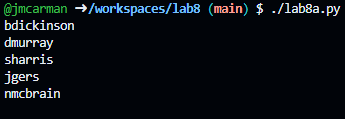
When you are done testing, run the lab8a_test.py test script to confirm it passes with a 0 exit code. Once it does, commit your changes and push them to your GitHub repository. Your script should produce output similar to the following. If it does not, go back and complete whatever you've missed.
lab8b.py
Open the provided template lab8b.py. Update the comment block with the appropriate information for name, date, and usage.
Prompting the user to input a username
Using what you learned previously, fill in the template with the following:
- Using the prompt "Enter a username: ", prompt the user to input a username. Store this in the variable username.
Opening the file with append access
Use the following code to open the users.dat file for appending. Note a represents the permissions, in this case append. Alternatively, you could open the file for writing using w. Since we only want to add content to the bottom of the file, append is safer. In lab8a you used the r permission to open the file for reading.
Use the following code to open the file for appending.
with open("users.dat", "a") as usersFile:
Writing the username
Use the following code to write the username to the file.
usersFile.write(username + "\n")
To do: closing the file
Use what you learned in lab8a to close the file.
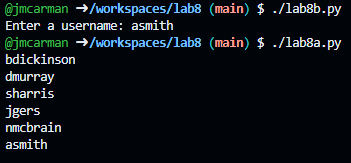
Run lab8b.py to add asmith, edhunter, and as many usernames as you wish. You can run lab8a.py to read the users.dat file to confirm the users have been added. When you are done testing, run the lab8b_test.py test script to confirm it passes with a 0 exit code. Once it does, commit your changes and push them to your GitHub repository. Your script should produce output similar to the following. If it does not, go back and complete whatever you've missed.
Completing the Lab
Upon completing the of the lab you have created two python scripts that demonstrate reading and appending to files.
Exploration Questions
The following questions are for furthering your knowledge only, and may appear on quizzes or tests at any time later in this course.
- What is the difference between opening a file for reading and appending?
- How do you print the contents of a file?
- How do you append data to a file?
- How do you close a file?