Output & Strings
Overview
This week's lab will cover the following:
- Using strings.
- Using escape sequences to format output.
- Modifying string output with sep and end.
Lecture Slides
Creating your Github Repo for Lab 2
Use the following link to set up a GitHub repository for Lab 2. Open your Lab 2 repository in GitHub Codespaces, and open the provided template lab2.py. Update the comment block with the appropriate information for name, date, and usage.
To do:
In the provided template, prompt the user to enter a user's username and fullname. Store these in the variables userName and fullName respectively. Use the following prompts:
- "Enter a username: "
- "Enter the user's full name: "
Modifying output with sep and end
You can modify output from the print command using the key words sep and end. They do the following:
- sep
- Replaces the separating character in a string (default is a space).
- end
- Replaces the line terminator in a string (default is a newline, represented by \n).
Print the user's username and full name, specifying a comma as the separator and semi-colon as the end. Comma separated values (csv) are commonly used in data files for programming and system administration.
print(userName, fullName, sep=",", end=";")
Using escape sequences
Escape sequences are a useful way to format output using formatting instructions. These can be provided to the print command. You used one in your hello world script to display a newline at the end of the line (\n). Another useful one is \t, which will display a tab.
Add a new line using the print function and the \n escape sequence.
print("\n")
New line escape sequene
Print the user's username and fullname on the screen, separated by a newline.
print(userName, fullName, sep="\n")
Tab escape sequence
Print the user's username and fullname on the screen, separated by a tab.
print(userName, fullName, sep="\t")
Completing the Lab
Your script should produce output similar to the following. If it does not, go back and complete whatever you've missed.
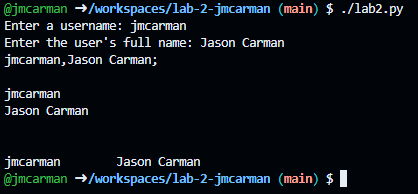
Upon completion of this lab you should have created a Python script that prompts for a user's username and full name, and stores the information in variables. You then formatted the output using sep and end, and escape sequences. To submit your lab you need to submit the code to your GitHub repo (which you did in already in the lab).
Exploration Questions
The following questions are for furthering your knowledge only, and may appear on quizzes or tests at any time later in this course.
- How does sep modify the print function's output?
- How does end modify the print function's output?
- What escape sequence will display a new line?
- What escape sequence will display a tab?