Functions
Overview
This week's lab will cover the following:
- Analyze the use of functions.
- Use user defined and built-in functions.
- Create a function in a library program.
- Import a function from another program.
- Use loops and lists.
Lecture Slides
Creating your Github Repo for Lab 7
Use the following link to set up a GitHub repository for Lab 7. Open your Lab 7 repository in GitHub Codespaces, and open the provided template lib.py. Update the comment block with the appropriate information for name, date, and usage.
Note: There is also a lab7a.py & lab7b.py, which you will be using later in the lab.Functions
Functions are a way to organize your code into reusable blocks. Functions are defined using the def keyword followed by the function name and parentheses. The function name should be descriptive of what the function does. The parentheses can contain arguments that are passed to the function. The function block is indented and contains the code that the function will execute. The function can return a value using the return keyword. Use the following code to create a function called combine that accepts the arguments prefix, suffix & place. It will then return the combined string of all three arguments in the following format: "prefix suffix of place".
		def combine(prefix, suffix, place):
			return prefix + " " + suffix + " of " + place
You will be using this function in lab7a.py & lab7b.py.
lab7a.py
Open the provided template lab7a.py. Update the comment block with the appropriate information for name, date, and usage.
Importing Modules and Functions
To do: Import the random module.
So far you have been writing all your code in a single file. As your programs grow in size, it is a good idea to break them up into smaller, more manageable pieces. Python allows you to import functions from other files. This is done using the import keyword followed by the name of the file (without the .py extension). You can then call the function as if it had been written in the current program. Use the following code to import the combine function from the lib file.
from lib import combine
To do: Create the following lists
prefixes
- "Shiny"
- "Rusty"
- "Broken"
- "Mighty"
- "Cursed"
- "Blessed"
- "Enchanted"
- "Mysterious"
- "Ancient"
- "Fragile"
suffixes
- "Sword"
- "Shield"
- "Dagger"
- "Staff"
- "Bow"
- "Axe"
- "Mace"
- "Spear"
- "Wand"
- "Orb"
places
- "Edinburgh"
- "Glasgow"
- "Aberdeen"
- "Dundee"
- "Inverness"
- "Stirling"
- "Perth"
- "St. Andrews"
- "Fort William"
- "Oban"
To do: Prompt the user
Using the prompt "How many items would you like to generate? " store the user's input in the variable numItems.
To do: Generate the items
The following code will use a for loop to generate the number of items the user requested using:
- A random prefix (stored in the variable prefix)
- A random suffix (stored in the variable suffix)
- A random place (stored in the variable place)
	for item in range(int(numItems)):
		prefix = prefixes[random.randint(0, len(prefixes)-1)]
		suffix = suffixes[random.randint(0, len(suffixes)-1)]
		place = places[random.randint(0, len(places)-1)]
Still in the for loop, use the combine function to generate the item name and print it to the screen.
		item = combine(prefix, suffix, place)
		print(item)
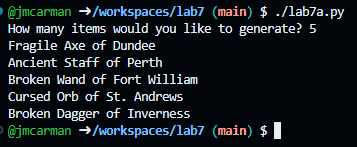
Run your script and test it with the value 5. It should generate 5 items with random prefixes, suffixes, and places. When you are done testing, run the lab7a_test.py test script to confirm it passes with a 0 exit code. Once it does, commit your changes and push them to your GitHub repository. Your script should produce output similar to the following. If it does not, go back and complete whatever you've missed.
lab7b.py
Open the provided template lab7b.py. Update the comment block with the appropriate information for name, date, and usage. Using what you learned in lab7a.py, fill in the template with the following:
prefixes
- "Sir"
- "Lady"
- "Lord"
- "Dame"
- "Master"
- "Mistress"
- "King"
- "Queen"
- "Prince"
- "Princess"
suffixes
- "Arthur"
- "Gwen"
- "Merlin"
- "Morgana"
- "Lancelot"
- "Guinevere"
- "Uther"
- "Mordred"
- "Nimueh"
- "Gaius"
places
- "Camelot"
- "Ealdor"
- "Essetir"
- "Gorlois"
- "Merlin's Cave"
- "Tintagel"
- "Avalon"
- "Albion"
- "Caerleon"
- "Cadbury"
To do:
Using what you learned in lab7a.py, complete the following:
- Using the prompt "How many names would you like to generate? " store the user's input in the variable names.
- Generate the names using a for loop.
- Still in the for loop, use the combine function to generate the name and print it to the screen.
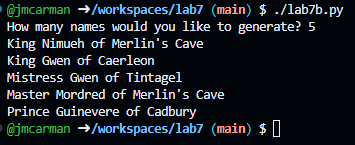
Run your script and test it with the value 5. It should generate 5 names with random prefixes, suffixes, and places. When you are done testing, run the lab7b_test.py test script to confirm it passes with a 0 exit code. Once it does, commit your changes and push them to your GitHub repository. Your script should produce output similar to the following. If it does not, go back and complete whatever you've missed.
Completing the Lab
By the end of the lab you have created three Python scripts that demonstrate using and importing functions, and the use of loops.
Exploration Questions
The following questions are for furthering your knowledge only, and may appear on quizzes or tests at any time later in this course.
- How do you declare a function?
- What are functions used for?
- What does return do?
- How can you import a function by name from another program?