Operators, Variables & Formatting Data
Overview
This week's lab will cover the following:
- Using Python to perform math.
- Demonstrate operator precedence.
- Formatting output using the format() function.
Lecture Slides
Creating your Github Repo for Lab 3
Use the following link to set up a GitHub repository for Lab 3. Open your Lab 3 repository in GitHub Codespaces, and open the provided template lab3a.py. Update the comment block with the appropriate information for name, date, and usage.
Note: There is also a lab3b.py, which you will be using later in the lab.Modules
Modules in Python are code libraries that contain specialized functions and variables. You can import a module into your script to use its functions and variables. Python has many built-in modules that you can use to perform various tasks.
For example, the math module contains functions for performing mathematical operations. To use the math module, you need to import it into your script. You can import the math module using the following code:
import math
Prompting for user input
To do:
- Prompt the user for a number using the following prompt: "Please enter a number: ". Store the value in the variable num1.
- Prompt the user for a second number using the following prompt: "Please enter a second number: ". Store the value in the variable num2.
Use the print function to display "num1 + num2 = result" where result is the result of the math.
print(num1, " + ", num2, " = ", num1 + num2)
Run your script using the value 1 for both numbers. Note it prints out 11. 1 + 1 isn't 11, it's 2. However, Python is treating num1 and num2 as strings. You can confirm num1's data type with the following code:
print(type(num1))It is common to use the print function to debug your code. You can use it to display the value of variables, or to confirm the data type of a variable. This can help you identify issues in your code. When you are done testing you should comment out the print statement by placing a # in front of it. This will prevent it from displaying when you run your script. When you are confident your script is working correctly, you can remove the print statement.
Python Math
To get it to treat the numbers as integers, you need to convert them. Use the following sample to correct your script so it produces the expected output.
print(num1, " + ", num2, " = ", int(num1) + int(num2))
Run your script again using the value 1 for both numbers. It should produce the correct output (2).
To do:
Using the above sample, fill in the following in the provided template:
- The result of num1 - num2
- The result of num1 * num2
- The result of num1 / num2
Exponentiation and Modulus
Python also supports the exponentiation operator (**) and modulus operator (%). The exponentiation operator raises a number to a power, while the modulus operator returns the remainder of a division operation. Modulus can be useful for to determine if a number is odd or even. If a number is odd, the modulus will be 1. If a number is even, the modulus will be 0.
The following code will calculate the output of 2 to the power of 1:
print(num1, "**", num2, "=", int(num1) ** int(num2))
The following code calculates the remainder of num1 divided by num2:
print(num1, "%", num2, "=", int(num1) % int(num2))
Remember, if the variable you are using is a string you will have to convert it to an integer or your code will output an error.
To do:
Using the above sample, fill in the following in the provided template:
- The result of num1 to the power of num2
- The result of num1 modulus num2
Operator Precedence
Operator precedence determines the order in which operators are evaluated in an expression. For example, multiplication and division have a higher precedence than addition and subtraction. This means that multiplication and division are evaluated before addition and subtraction. You can use parentheses to change the order of evaluation. You may have learned this in school as BEDMAS or PEDMAS.
Square Root
The math module contains functions for advanced mathematical operations. One of these is function called sqrt() that calculates the square root of a number. To use the sqrt() function, you need to import the math module (which we did earlier in the lab). Then you call the function using the following code:
print("The square root of ", num1, " is ", math.sqrt(int(num1)))
To do:
Using the above sample, fill in the following in the provided template:
- The square root of num1
- The square root of num2
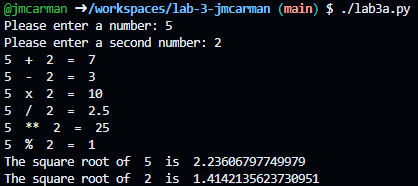
Test your script. Once it is producing the sample output below, close it and open lab3b.py.
lab3b.py
Open the provided template lab3b.py. Update the comment block with the appropriate information for name, date, and usage.
To do:
Using what you learned previously, complete the following:
- Import the math module
- Provide the user with the following prompt, and store the output in the variable grade: "Please enter the grade you got on your test: "
- Provide the user with the following prompt, and store the output in the variable denominator: "Please enter what the test was scored out of: "
Calculate the percentage of the grade using the following formula. Store the output in the variable final.
final=(float(grade) / float(denominator))
Create a variable called msg to store a message in, with a placeholder formatting the percentage with 0 places after the decimal.
msg="You scored {:.0%} on your test."
Print the message to the screen using the format function.
print(msg.format(final))
Run your script using the value 80 for grade and 100 for denominator. It should produce the following output:
 >
>
To do:
- Using the above sample, modify .0% in the format to .1%. Run your script again and observe the output.
- Now modify .1% in the format to .2%. Run your script again and observe the output.
Completing the Lab
Your script should produce output similar to the following. If it does not, go back and complete whatever you've missed.
Exploration Questions
The following questions are for furthering your knowledge only, and may appear on quizzes or tests at any time later in this course.
- What module contains functions for performing mathematical operations?
- What is the difference between an integer and a float?
- What is the modulus operator used for?
- How do you represent exponentiation in Python?
- How do you modify formatting using the format function?